ESP01s小玩具里我最喜欢的一个,为啥?别问,帅就完事了。(3/3)
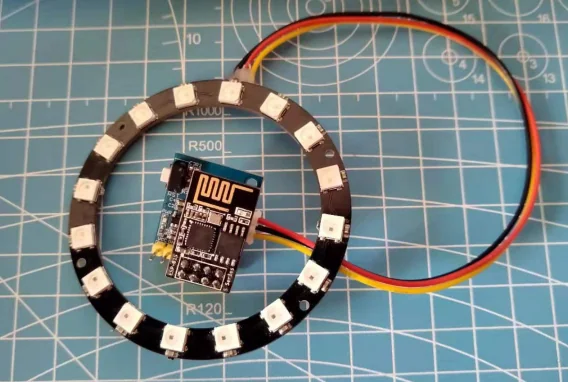
什么是性能的象征? R!G!B! 什么是男人的信仰? R!G!B! 你会选择女人还是RGB? 当然!R!G!B!
演示视频
首先安装WS2812支持库
点击项目>加载库>库管理器>搜索NeoPixel>安装库

因为,示例程序使用的就是这个库。当然你可以直接搜索WS2812,选择一个你觉得顺手的库
示例代码
#include <Adafruit_NeoPixel.h>
#ifdef __AVR__
  #include <avr/power.h>
#endif

#define PIN 2

#define NUM_LEDS 16

#define BRIGHTNESS 50

Adafruit_NeoPixel strip = Adafruit_NeoPixel(NUM_LEDS, PIN, NEO_GRBW + NEO_KHZ800);

byte neopix_gamma[] = {
    0,  0,  0,  0,  0,  0,  0,  0,  0,  0,  0,  0,  0,  0,  0,  0,
    0,  0,  0,  0,  0,  0,  0,  0,  0,  0,  0,  0,  1,  1,  1,  1,
    1,  1,  1,  1,  1,  1,  1,  1,  1,  2,  2,  2,  2,  2,  2,  2,
    2,  3,  3,  3,  3,  3,  3,  3,  4,  4,  4,  4,  4,  5,  5,  5,
    5,  6,  6,  6,  6,  7,  7,  7,  7,  8,  8,  8,  9,  9,  9, 10,
   10, 10, 11, 11, 11, 12, 12, 13, 13, 13, 14, 14, 15, 15, 16, 16,
   17, 17, 18, 18, 19, 19, 20, 20, 21, 21, 22, 22, 23, 24, 24, 25,
   25, 26, 27, 27, 28, 29, 29, 30, 31, 32, 32, 33, 34, 35, 35, 36,
   37, 38, 39, 39, 40, 41, 42, 43, 44, 45, 46, 47, 48, 49, 50, 50,
   51, 52, 54, 55, 56, 57, 58, 59, 60, 61, 62, 63, 64, 66, 67, 68,
   69, 70, 72, 73, 74, 75, 77, 78, 79, 81, 82, 83, 85, 86, 87, 89,
   90, 92, 93, 95, 96, 98, 99,101,102,104,105,107,109,110,112,114,
  115,117,119,120,122,124,126,127,129,131,133,135,137,138,140,142,
  144,146,148,150,152,154,156,158,160,162,164,167,169,171,173,175,
  177,180,182,184,186,189,191,193,196,198,200,203,205,208,210,213,
  215,218,220,223,225,228,231,233,236,239,241,244,247,249,252,255 };


void setup() {
  // This is for Trinket 5V 16MHz, you can remove these three lines if you are not using a Trinket
  #if defined (__AVR_ATtiny85__)
    if (F_CPU == 16000000) clock_prescale_set(clock_div_1);
  #endif
  // End of trinket special code
  strip.setBrightness(BRIGHTNESS);
  strip.begin();
  strip.show(); // Initialize all pixels to 'off'
}

void loop() {
  // Some example procedures showing how to display to the pixels:
  colorWipe(strip.Color(255, 0, 0), 50); // Red
  colorWipe(strip.Color(0, 255, 0), 50); // Green
  colorWipe(strip.Color(0, 0, 255), 50); // Blue
  colorWipe(strip.Color(0, 0, 0, 255), 50); // White

  whiteOverRainbow(20,75,5);

  pulseWhite(5);

  // fullWhite();
  // delay(2000);

  rainbowFade2White(3,3,1);


}

// Fill the dots one after the other with a color
void colorWipe(uint32_t c, uint8_t wait) {
  for(uint16_t i=0; i<strip.numPixels(); i++) {
    strip.setPixelColor(i, c);
    strip.show();
    delay(wait);
  }
}

void pulseWhite(uint8_t wait) {
  for(int j = 0; j < 256 ; j++){
      for(uint16_t i=0; i<strip.numPixels(); i++) {
          strip.setPixelColor(i, strip.Color(0,0,0, neopix_gamma[j] ) );
        }
        delay(wait);
        strip.show();
      }

  for(int j = 255; j >= 0 ; j--){
      for(uint16_t i=0; i<strip.numPixels(); i++) {
          strip.setPixelColor(i, strip.Color(0,0,0, neopix_gamma[j] ) );
        }
        delay(wait);
        strip.show();
      }
}


void rainbowFade2White(uint8_t wait, int rainbowLoops, int whiteLoops) {
  float fadeMax = 100.0;
  int fadeVal = 0;
  uint32_t wheelVal;
  int redVal, greenVal, blueVal;

  for(int k = 0 ; k < rainbowLoops ; k ++){

    for(int j=0; j<256; j++) { // 5 cycles of all colors on wheel

      for(int i=0; i< strip.numPixels(); i++) {

        wheelVal = Wheel(((i * 256 / strip.numPixels()) + j) & 255);

        redVal = red(wheelVal) * float(fadeVal/fadeMax);
        greenVal = green(wheelVal) * float(fadeVal/fadeMax);
        blueVal = blue(wheelVal) * float(fadeVal/fadeMax);

        strip.setPixelColor( i, strip.Color( redVal, greenVal, blueVal ) );

      }

      //First loop, fade in!
      if(k == 0 && fadeVal < fadeMax-1) {
          fadeVal++;
      }

      //Last loop, fade out!
      else if(k == rainbowLoops - 1 && j > 255 - fadeMax ){
          fadeVal--;
      }

        strip.show();
        delay(wait);
    }

  }


  delay(500);


  for(int k = 0 ; k < whiteLoops ; k ++){

    for(int j = 0; j < 256 ; j++){

        for(uint16_t i=0; i < strip.numPixels(); i++) {
            strip.setPixelColor(i, strip.Color(0,0,0, neopix_gamma[j] ) );
          }
          strip.show();
        }

        delay(2000);
    for(int j = 255; j >= 0 ; j--){

        for(uint16_t i=0; i < strip.numPixels(); i++) {
            strip.setPixelColor(i, strip.Color(0,0,0, neopix_gamma[j] ) );
          }
          strip.show();
        }
  }

  delay(500);


}

void whiteOverRainbow(uint8_t wait, uint8_t whiteSpeed, uint8_t whiteLength ) {

  if(whiteLength >= strip.numPixels()) whiteLength = strip.numPixels() - 1;

  int head = whiteLength - 1;
  int tail = 0;

  int loops = 3;
  int loopNum = 0;

  static unsigned long lastTime = 0;


  while(true){
    for(int j=0; j<256; j++) {
      for(uint16_t i=0; i<strip.numPixels(); i++) {
        if((i >= tail && i <= head) || (tail > head && i >= tail) || (tail > head && i <= head) ){
          strip.setPixelColor(i, strip.Color(0,0,0, 255 ) );
        }
        else{
          strip.setPixelColor(i, Wheel(((i * 256 / strip.numPixels()) + j) & 255));
        }

      }

      if(millis() - lastTime > whiteSpeed) {
        head++;
        tail++;
        if(head == strip.numPixels()){
          loopNum++;
        }
        lastTime = millis();
      }

      if(loopNum == loops) return;

      head%=strip.numPixels();
      tail%=strip.numPixels();
        strip.show();
        delay(wait);
    }
  }

}
void fullWhite() {

    for(uint16_t i=0; i<strip.numPixels(); i++) {
        strip.setPixelColor(i, strip.Color(0,0,0, 255 ) );
    }
      strip.show();
}


// Slightly different, this makes the rainbow equally distributed throughout
void rainbowCycle(uint8_t wait) {
  uint16_t i, j;

  for(j=0; j<256 * 5; j++) { // 5 cycles of all colors on wheel
    for(i=0; i< strip.numPixels(); i++) {
      strip.setPixelColor(i, Wheel(((i * 256 / strip.numPixels()) + j) & 255));
    }
    strip.show();
    delay(wait);
  }
}

void rainbow(uint8_t wait) {
  uint16_t i, j;

  for(j=0; j<256; j++) {
    for(i=0; i<strip.numPixels(); i++) {
      strip.setPixelColor(i, Wheel((i+j) & 255));
    }
    strip.show();
    delay(wait);
  }
}

// Input a value 0 to 255 to get a color value.
// The colours are a transition r - g - b - back to r.
uint32_t Wheel(byte WheelPos) {
  WheelPos = 255 - WheelPos;
  if(WheelPos < 85) {
    return strip.Color(255 - WheelPos * 3, 0, WheelPos * 3,0);
  }
  if(WheelPos < 170) {
    WheelPos -= 85;
    return strip.Color(0, WheelPos * 3, 255 - WheelPos * 3,0);
  }
  WheelPos -= 170;
  return strip.Color(WheelPos * 3, 255 - WheelPos * 3, 0,0);
}

uint8_t red(uint32_t c) {
  return (c >> 16);
}
uint8_t green(uint32_t c) {
  return (c >> 8);
}
uint8_t blue(uint32_t c) {
  return (c);
}
Arduino IDE 编译烧录固件
这里我们不再啰嗦一遍,如何烧录上传固件了,需要的话可以看这里